WHAT WE LEARN
In this video, we discuss about:
- Select * vs Select specific column names
- Alias (AS)
- Computed columns
- ORDER BY
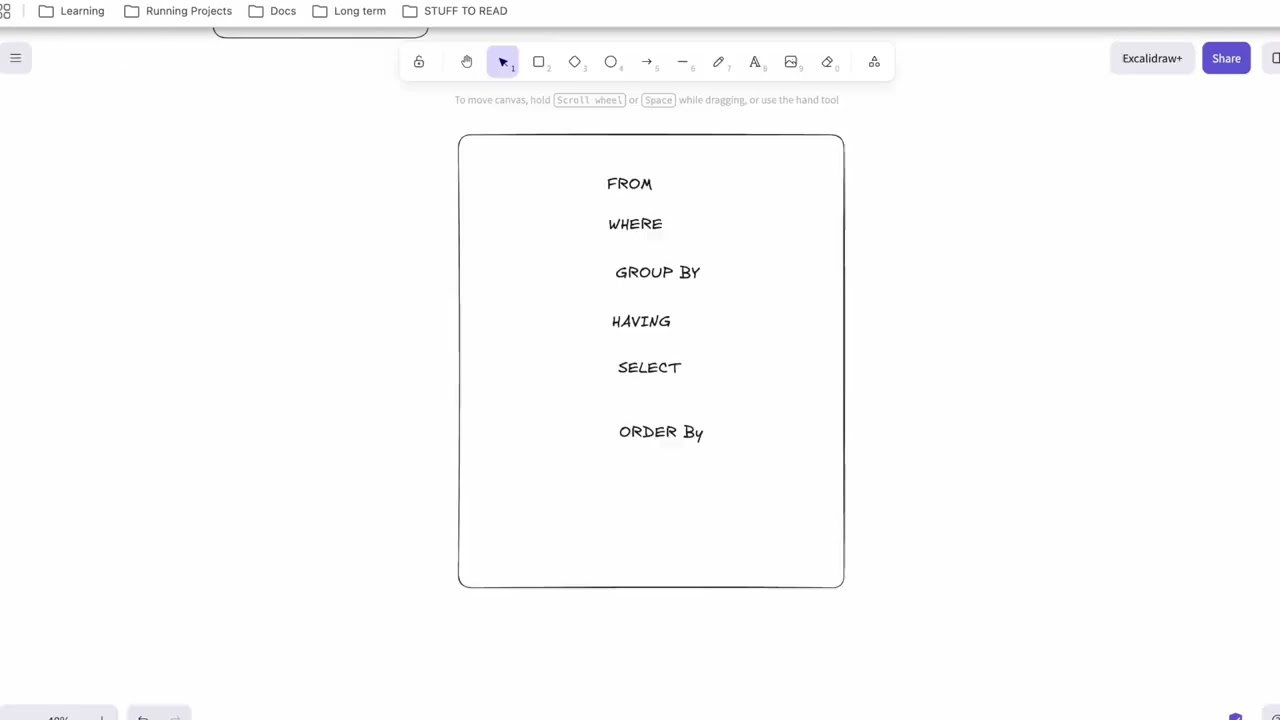
- Execution Order
Challenge question
Question 1:
Select only the
product_name,unit_price, andcategoryfrom the products table. Rename the columns toProduct,Price, andType.Answer
SELECT product_name AS product, unit_price AS price , category AS type from products;
Question 2
Show every employee’s full name as one column called
full_nameand their job title asposition. Only from the Engineering department.Answer
SELECT
CONCAT(first_name,' ', last_name) AS full_name,
job_title AS position
FROM employees
WHERE department="engineering";
Question 3
From the
productstable, show the product name, unit price, and calculate the price after a 15% discount. Call itdiscounted_price.Answer
SELECT product_name,
unit_price,
unit_price*0.15 AS discounted_price
FROM products;
Question 4
From the
customerstable, showfirst_nameasFirst,last_nameasLast,cityasLocation, andsignup_dateasMember Since.Answer
SELECT
first_name AS first,
last_name AS last,
city AS Location,
signup_date AS member_since
FROM customers;
Question 5
Show every employee’s full name, salary, and their annual salary. Order by annual salary from highest to lowest.
Answer
SELECT
CONCAT_WS(" ", first_name, last_name) AS full_name,
salary,
salary * 12 AS annual_salary
FROM employees
ORDER BY annual_salary DESC


Note: concat_ws means concat with separtor: concat_ws(separator, expression 1,expression 2..)
Question 6
From
products, show the product name, unit price, cost price, and calculate the total cost per product. Call itline_total. Order by line_total descending.Answer
SELECT product_name,
unit_price,
cost_price,
unit_price * cost_price AS line_total
FROM products
ORDER BY line_total desc;
Question 7
From
order_items, show theitem_id,quantity,unit_price, the total line value asline_total, and build a label column that readsitem_id: line total— for example5: 299.99. Call itsummary.Answer
SELECT
item_id,
quantity,
unit_price,
unit_price* quantity as line_total,
CONCAT(item_id, ': ', unit_price * quantity) AS summary
 FROM order_items;
Question 8
From
employees, select full name, department, and monthly salary. Add a columntax_estimatewhich is 20% of salary. Order bytax_estimatedescending — using the alias, not the expression.Answer
SELECT
CONCAT_WS(" ", first_name, last_name) AS full_name,
department,
salary AS monthly_salary,
salary*0.20 as tax_estimate
FROM employees
ORDER BY tax_estimate DESC
;
Question 9
A junior dev wrote SELECT * FROM products and pushed it to production. Write the corrected query that shows only product_id, product_name, category, unit_price, and stock_qty — keeping cost_price out of the result.
Answer
SELECT
product_id,
product_name,
category,
unit_price
stock_qty
 FROM products;
Question 10
From
order_items, showitem_id,unit_price,quantity, the line total, the line total including 20% VAT asline_total_vat, and the VAT amount alone asvat_amount.Answer
SELECT
item_id,
unit_price,
quantity,
unit_price * quantity as line_total,
unit_price*quantity * 1.20 as line_total_vat,
unit_price * quantity * 0.20 as vat_amount
FROM order_items;
Question 11
Write a single SELECT from
employeesthat shows: full name, department, job title, annual salary, annual salary after a 10% raise asnew_salary, and the raise amount alone asraise_amount. Order byraise_amountdescending,Answer
SELECT
concat_ws(" ",first_name, last_name) as full_name,
department,
job_title,
salary as annual_salary,
salary* 1.10 as new_salary,
salary* 0.10 as raise_amount
FROM employees
order by raise_amount desc
Submit your answer on the comment box.